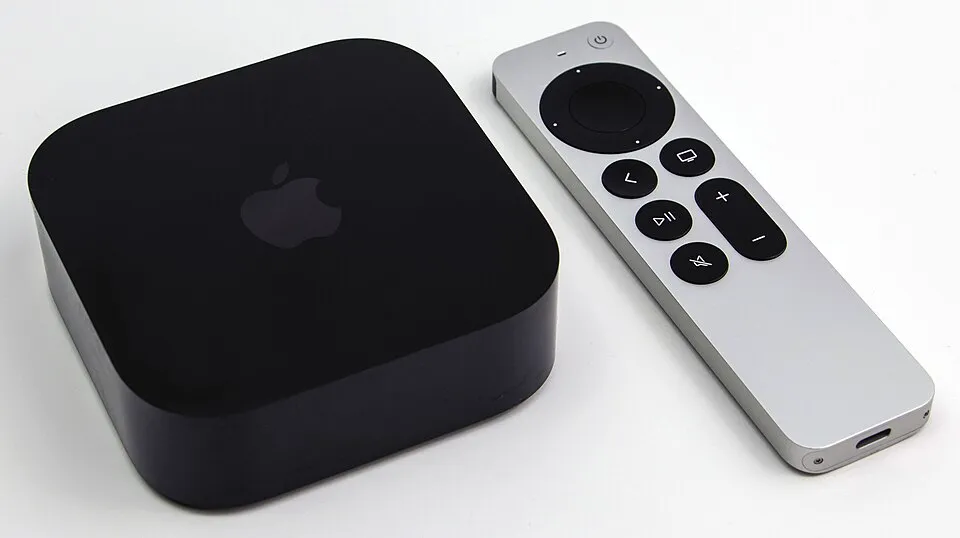
Apple TV 4K (3rd Gen) Review: Premium Pick
Apple's latest TV box brings the A15 Bionic chip, Wi-Fi 6, and tight iPhone integration. Is it worth $129 over cheaper alternatives?
- Released
- 2022
- Launch price
- $129
- Chipset
- Apple A15 Bionic
- RAM
- 4 GB
- Storage
- 64 / 128 GB
- OS
- tvOS
- Max output
- 4K @ 60fps
- HDR
- Dolby Vision, HDR10+, HLG
- Audio
- Dolby Atmos
- Connectivity
- Wi-Fi 6, Bluetooth 5.0, Ethernet (128GB), Thread
- Ports
- HDMI 2.1, Gigabit Ethernet (128GB)
- Remote
- Siri Remote (2nd gen, USB-C)
- Dimensions
- 93 x 93 x 31 mm
- Weight
- 208 g
Bottom line: The Apple TV 4K (3rd gen, from $129) is the best streaming box for anyone already in Apple’s ecosystem — the cleanest ad-free interface, the fastest chip in its class, AirPlay, and deep HomeKit integration. Outside that ecosystem a $50 stick does the job. One caveat for 2026: a new Apple Intelligence-capable model is expected this year.
Overview
The Apple TV 4K 3rd generation launched at $129 (Wi-Fi model) and $149 with Ethernet. It’s powered by the A15 Bionic — the same chip in the iPhone 13 Pro — which makes it massively overpowered for streaming, but that headroom means it’ll stay fast for years.
Performance
Performance is flawless. 4K HDR content loads instantly, apps never crash, and the interface is the smoothest of any streaming box we’ve tested. Frame rate matching (switching your TV to the native frame rate of the content) works automatically, which is a big deal for film lovers.
What We Liked
- Build quality — premium hardware that matches Apple devices
- Siri + HomeKit — best smart home integration of any streamer
- AirPlay — cast from iPhone/Mac instantly
- No ads — clean, ad-free interface
- tvOS ecosystem — great exclusive apps and Apple Arcade
What We Didn’t Like
- Price — $129 is steep when Roku/Fire TV cost $30-60
- Apple ecosystem required — loses much of its value if you don’t use iPhone/Mac
- No Google Play — Android apps aren’t available
- Siri is inconsistent — great for Apple apps, weak for third-party search
How It Compares
Against the Fire TV Stick 4K Max and Roku Ultra, the Apple TV wins on speed, build quality, and a genuinely ad-free home screen — but it costs more and assumes you own other Apple gear. Against the NVIDIA Shield TV Pro it’s just as fast and far tidier, yet can’t host Plex or sideload Android apps. If you want Google’s cross-service content aggregation instead, the Google TV Streamer is the $99 alternative.
A 2026 note: a next-generation Apple TV with an A17 Pro-class chip and Apple Intelligence is widely expected this year (see our AI on your TV box guide). If AI features matter to you and you don’t already own an Apple TV, it may be worth waiting.
Who Should Buy It
- iPhone, iPad, or Mac owners who’ll use AirPlay and want one consistent ecosystem.
- HomeKit households wanting a Thread border router and smart-home hub (the 128GB model adds Ethernet + Thread).
- Anyone who hates ads and sponsored rows on their streaming home screen.
Skip it if you don’t use Apple devices — you’ll pay a premium for features you can’t fully take advantage of.
Verdict
For iPhone users already in the Apple ecosystem, the Apple TV 4K is the best streaming box you can buy. For everyone else, a Fire TV Stick or Roku will serve you just as well for half the price.